
Service Management Overview
Information Systems & Services manages technology through a service management approach.
ISS uses concepts and practices from the Information Technology Infrastructure Library (ITIL) as a foundation for how we think about, organize, support, and improve technology services. ITIL provides useful terminology and a framework for understanding how technology creates value for an organization.
ISS does not attempt to implement every ITIL practice exactly as described by the framework. We use ITIL concepts where they provide value and adapt them to the size, structure, and needs of McLennan Community College.
The goal is not to “do ITIL.” The goal is to provide reliable, secure, supportable, and useful technology services that create value for the College community.
Services
A service represents a technology capability or outcome ISS provides to the College.
A service is larger than an individual application, server, appliance, or vendor product. It may depend on several technologies, processes, employees, vendors, and other resources working together.
Examples of ISS services may include:
- Routing and Switching
- Identity Management
- Classroom Technology
- Enterprise Resource Planning (ERP)
- Telecommunications
Services describe what we provide, not necessarily the products we use to provide it.
Whenever practical, ISS services should be named for the capability or outcome they provide rather than a specific vendor product. Products change over time while the underlying service may remain.
For example, a service might be called MyMCC rather than being named after the individual applications or products currently used to deliver MyMCC.
Service Offerings
Each service may contain one or more service offerings.
A service offering represents a specific capability or portion of the larger service that ISS provides and manages.
For example:
Email Service
The Email service may include service offerings such as:
- Microsoft 365 / Exchange Online — email delivery and mailbox services
- Barracuda Email Security — spam and email-security filtering
- Phishing Report Button — a mechanism for users to report suspected phishing messages
The customer experiences these capabilities together as Email, even though ISS manages several different technologies and responsibilities underneath the service.
Routing and Switching Service
The Routing and Switching service may include service offerings such as:
- Firewall
- Wireless
- Routing
These offerings collectively provide the network connectivity on which many other College services depend.
Supporting Technologies and Components
Service offerings may themselves depend on individual technology components such as:
- Servers
- Appliances
- Controllers
- Software
- Cloud platforms
- Network devices
- Databases
- Vendor systems
- Integrations
The service exists because of the outcome the College receives, not because ISS owns or licenses a particular product.
This creates a useful hierarchy:
Service
→ Service Offering
→ → Supporting Technologies and Components
Why This Structure Matters
Organizing technology as services and service offerings helps ISS understand:
- What we provide.
- Who depends on it.
- Who is responsible for it.
- What technologies support it.
- What documentation is required.
- What happens when it fails.
- What maintenance it requires.
- What other services depend upon it.
- How it should be improved over time.
It also allows us to change technologies without redefining the service every time a product or vendor changes.
Plan, Build, Operate
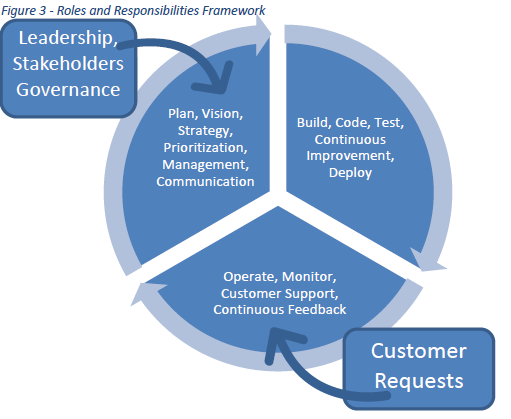
ISS uses Plan → Build → Operate as a general operating model for understanding where work occurs within the department.
These categories describe work, not permanent employee roles.
Plan
Plan work helps determine what ISS should do and why.
Examples include:
- Vision and strategy
- Understanding College needs
- Prioritization
- Resource planning
- Evaluating opportunities
- Identifying risks
- Planning future changes
- Communication and coordination
Build
Build work creates, changes, improves, or replaces technology services.
Examples include:
- Projects
- Enhancements
- Configuration
- Development
- Significant upgrades
- Testing
- Deployment
- Automation
- Service improvements
Formal projects are one type of Build work, but not all Build work requires the full project methodology.
Operate
Operate work keeps existing services functioning and supports the people who use them.
Examples include:
- Customer support
- Service requests
- Incident response
- Monitoring
- Troubleshooting
- Routine operations
- Day-to-day administration
Operate also creates valuable feedback. Repeated incidents, customer questions, ticket trends, service performance, and support experience can identify opportunities for improvement that flow back into Plan and Build.
The model is therefore a cycle.
Plan → Build → Operate → Feedback → Plan
People Wear Multiple Hats
Plan, Build, and Operate do not describe permanent jobs.
An ISS employee may perform work in multiple areas depending on responsibilities and assignments. An employee might support a service in Operate, participate in a project in Build, and contribute to planning or evaluation work in Plan.
Managers must be specific and deliberate when assigning work and protecting employee time.
ISS must continually balance three needs:
- Support what the College needs now by operating and supporting existing services.
- Improve what we already provide through maintenance, automation, documentation, security improvements, problem reduction, and continual improvement.
- Deliver future value through projects and changes that introduce, upgrade, replace, or significantly improve technology services.
No single area can consume all of our attention.
If we focus only on Operate, ISS becomes entirely reactive and never improves. If we focus only on Build, current customers and services suffer. If we focus only on Plan, ideas never become working solutions.
Effective service management requires an intentional balance among all three.
Managing the Full Service Lifecycle
Our responsibility does not end when technology is purchased or installed.
ISS must also:
- Support it.
- Monitor it.
- Maintain it.
- Secure it.
- Document it.
- Communicate about it.
- Recover it when it fails.
- Improve it when needs change.
- Replace or retire it when appropriate.
This reflects our commitment to People Matter, Communication Matters, Integrity Matters, and Excellence Matters. Technology exists to support the College and the people who depend upon it.
The remaining sections of this chapter describe many of the practices ISS uses to accomplish that work.